Mac app for UUNA TEK and Kvenjoy writing machines
Handwritten letters at scale.
Write a letter once, merge it with your customer list, and let your pen plotter write every single one by hand, each a little different, each with its own name, code and QR code.
Requires macOS 11 or later and a UUNA TEK / Kvenjoy writing machine with K_AT firmware.
- Paper
- A4, A5, A6, DL, C6 or your own size
- Connection
- Wi-Fi or USB
- Recipient data
- CSV and JSON
- For your own systems
- REST API, MCP, command line
What PenBlitz does
- Handwriting that never repeats
- Every letter, word and line varies slightly, and every sheet sits a little differently. A batch looks written, not printed.
- Mail merge built in
- Open a CSV or JSON file, place placeholders, preview every recipient. One row becomes one sheet.
- A QR code per recipient
- Personal links and voucher codes, drawn by the pen so they scan, even with a thicker pen.
- Your signature, your logo
- Photograph a signature and PenBlitz turns it into a single pen line. Several versions rotate at random.
- Ready for the post box
- The postcard layout keeps the stamp area and the sorting strip free and fits long addresses by itself.
- Works with your tools
- A REST API for your shop or CRM, and a connector for AI assistants such as Claude Code or Codex.
How a mailing goes
- 1 / 3
Write
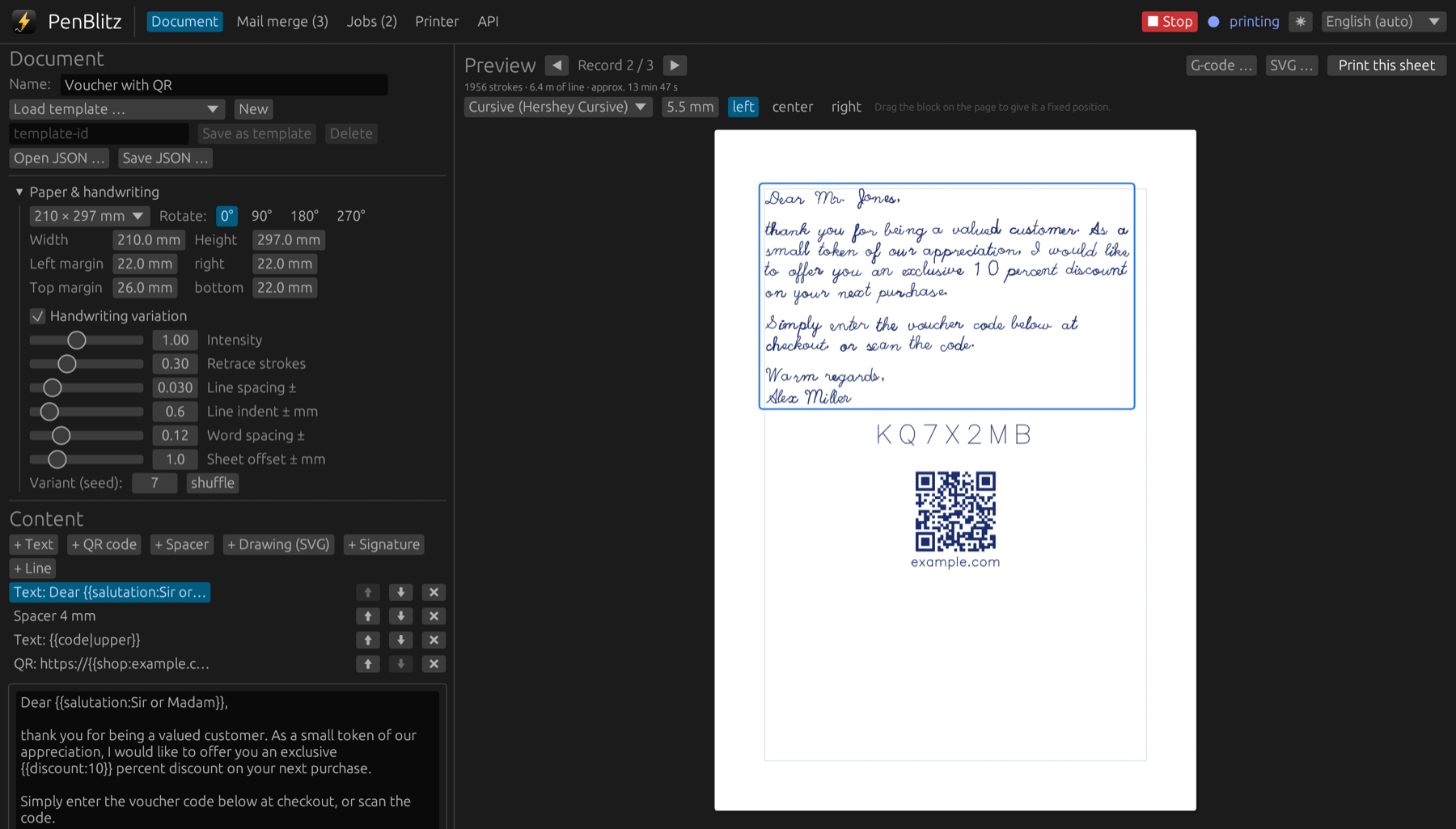
Type your letter, choose a handwriting and drag text, signature and QR code where you want them. The preview shows every pen stroke.
- 2 / 3
Merge
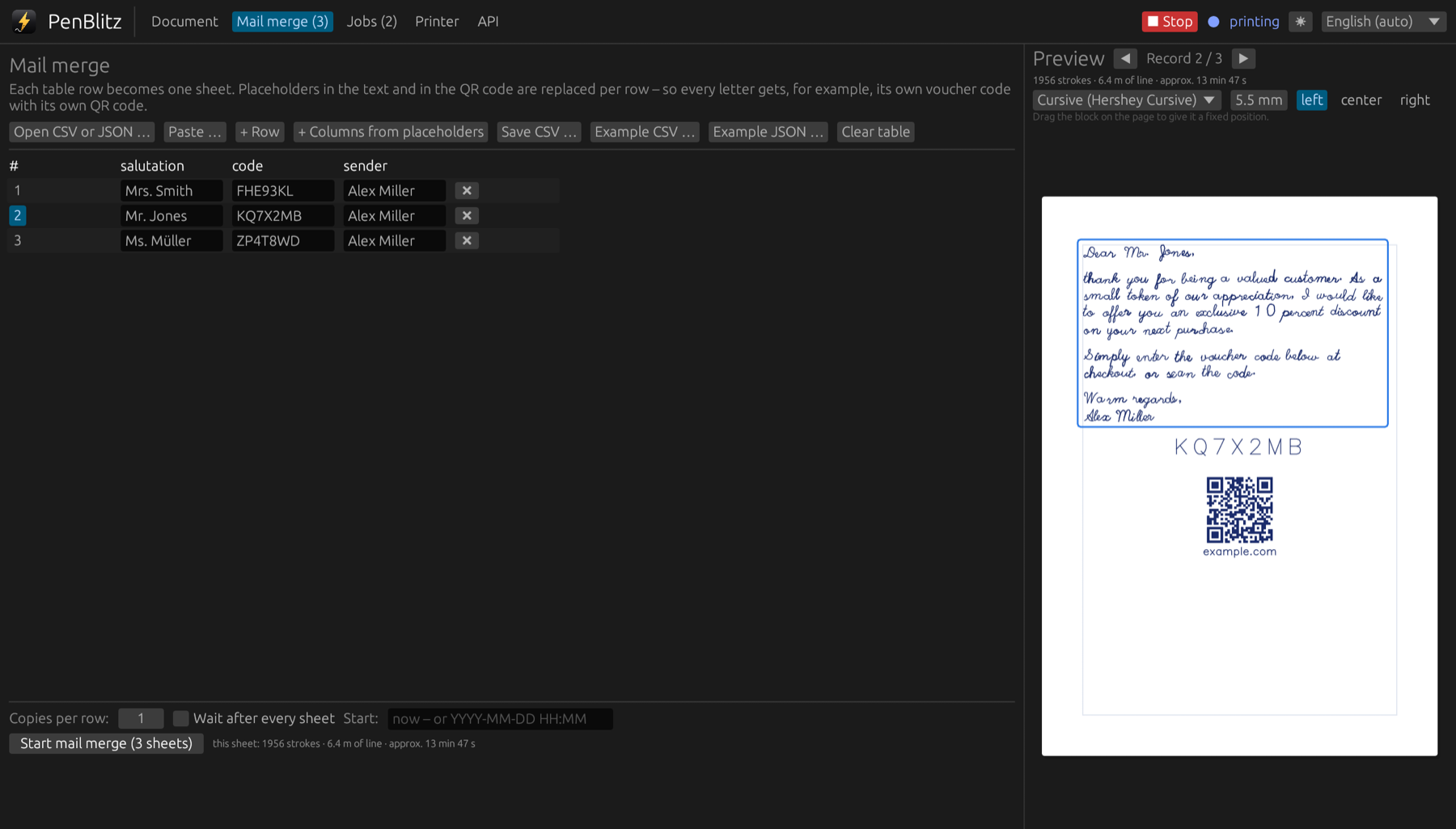
Load your recipients from a spreadsheet. PenBlitz checks the data and shows you each sheet before the machine starts writing.
- 3 / 3
Print
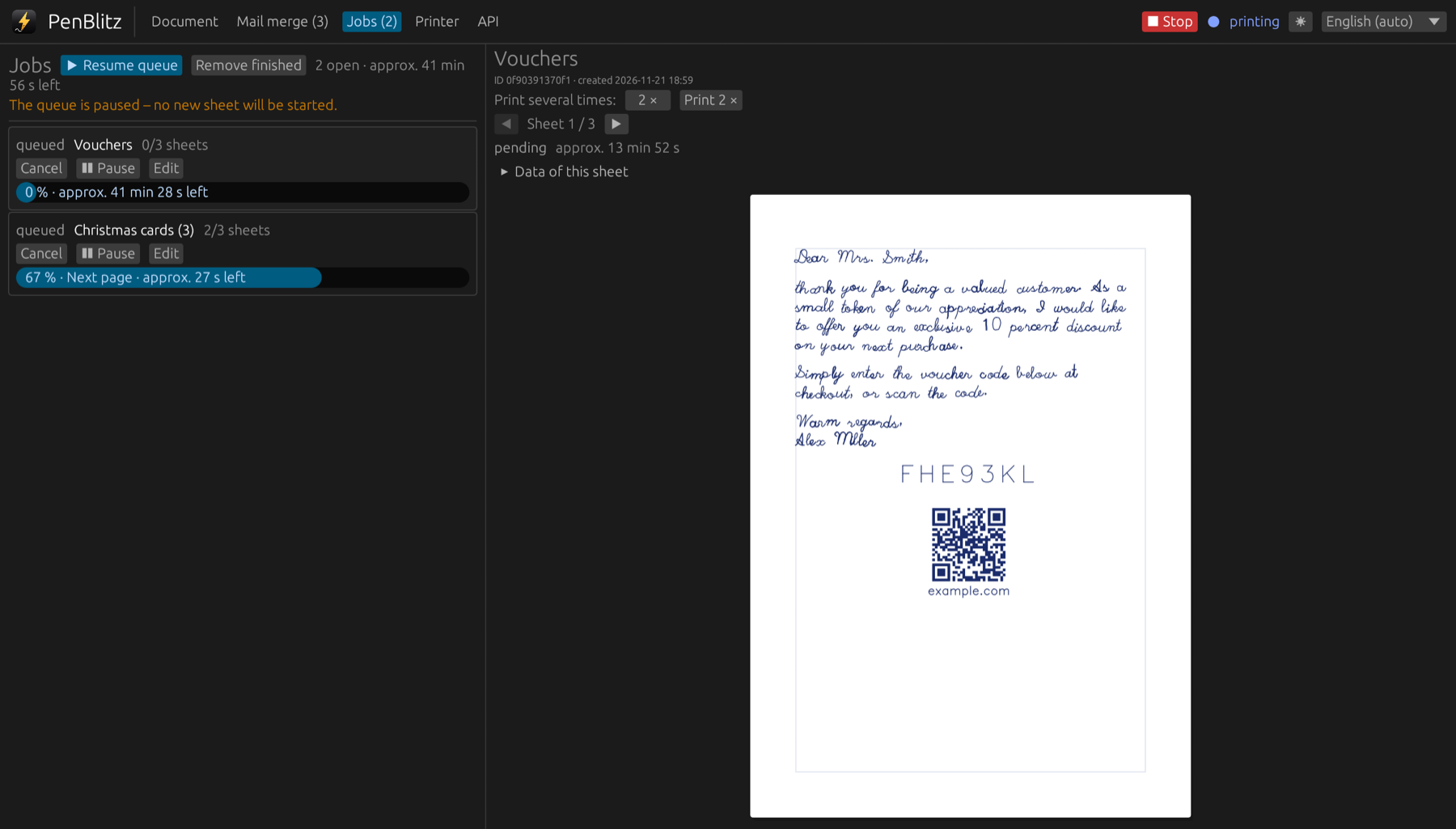
Send the batch to the machine over Wi-Fi or USB. The queue shows progress and remaining time, and you can pause at any sheet.
The features in detail
PenBlitz replaces the vendor software for day-to-day work and adds what a mailing needs.
- 01Handwriting that looks writtenNo two letters are the same. PenBlitz varies shapes, spacing and position the way a hand does, so a batch of five hundred does not look like five hundred copies.
- 02Mail mergeOne row in your list becomes one handwritten sheet. PenBlitz reads your data, fills the placeholders and shows every result before printing.
- 03QR codes drawn by penA personal QR code on every letter: a voucher, a tracking link, a review page. PenBlitz draws it so that phones can read it.
- 04Signatures and drawingsSign every letter with your own hand: take a photo of your signature and PenBlitz turns it into a single clean pen line.
- 05Postcards and envelopesLayouts that the post office accepts: the stamp area and the sorting strip stay free, and a long address is made to fit.
- 06Document editorCompose a sheet from text, QR codes, drawings and lines, move things with the mouse, and see every pen stroke before you print.
- 07Job queueQueue as many jobs as you like. PenBlitz prints them sheet by sheet and keeps you informed.
- 08Printer connectionOver Wi-Fi or by cable. PenBlitz finds the machine, loads each sheet into its memory and prints reliably.
- 09REST APILet your shop, CRM or script order handwritten letters by itself.
- 10AI assistantsTell Claude Code, Codex, Claude Desktop or Cursor what to write. PenBlitz does the rest, and nothing prints without your approval.
- 11Languages and lookEnglish and German, light and dark. PenBlitz follows your Mac and can be switched at any time.
Help
Guides for the first print, the recipient data and the errors that come up most often.
- Getting started
- Connect the printer
- First print and calibration
- Paper and pens
- Mail merge with your data
- Placeholders
Developers
Connect PenBlitz to your own systems: the REST API, the MCP server for AI assistants and the command line.
- REST APIOrder letters from a shop, a CRM or a script.
- MCP serverLet AI assistants write with PenBlitz, safely.
- Command lineEverything without a window.
PenBlitz is coming to the Mac App Store.
The app is not available yet. This page will link to it once it has been approved.